Saturday, 17 August 2013

Google Chromecast

Google Chromecast


The good: 
The Google Chromecast is a dirt-cheap wireless video dongle that streams Netflix and YouTube to your TV using Android or iOS tablets as remotes, with Android users also getting access to Google Music and Google TV and Movies. Its small size hides neatly behind your TV and makes it easy to take on-the-go.

The bad: 
 The beta screen-mirroring feature won't work as well as you want it to, so you're largely limited to four apps and without support for several major ones, including Amazon Instant, HBO Go, MLB.TV, Spotify, and Rdio. The lack of a dedicated remote also means you always need a smartphone or tablet nearby.

The bottom line:  
Google's $35 Chromecast streaming-TV dongle is certainly cheap, but its limited initial app support and total reliance on mobile devices keep it well behind the Apple TV and Roku -- at least for now.


Apple replacing some 2011-2012 iMac graphics cards

Apple replacing some 2011-2012 iMac graphics cards


Apple on Friday began a new program to replace faulty graphics cards found in some mid-2011 to late-2012 iMacs. 

The program covers systems with AMD Radeon HD 6970M video cards. Those were found in the 27-inch iMac models with either the 3.1GHz or 3.4GHz quad-core Intel i-series chips. 

According to support language, the video cards could fail, "causing the computer display to appear distorted, white or blue with vertical lines, or to turn black."

The program overlaps with an earlier replacement program covering Seagate hard drives found on some iMacs.

How to play baseball

How to play baseball

Step 1: What you need

You only need a couple of things.

First you need a partner.

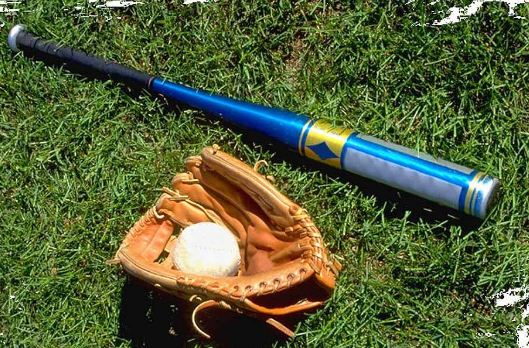
Second you need a baseball glove and bat. Your bat shouldn't be to heavy or to light also it shouldn't be to long or to short. You should have a bat that is just right.
Also you need a baseball if you don't have a baseball use a tennis ball.
 

Step 2: Learning to throw

Well this will teach you how to throw a baseball.

First stretch a little bit. Then try to throw the baseball to your partner try not to throw it under hand or side arm. Underhand is not good for the arm, and it's better to learn overhand when you're just starting. For now try to stay at least 10-15ft apart. Just keep throwing the ball back to each other for a little while. Try to follow through and at the end of the throw your arm should be pointing at the person you are throwing the baseball to. Practice throwing like picture 3 and 4 with only your wrist now once you have done that for a while practice with your partner. Now put all the pictures together arm up wrist cocked back and end up pointing at your partner.Now you know the basics of throwing. 

Step 3: Catching

To catch your partner should throw the baseball. You should try to catch the ball in the web of the glove not the pocket . Try to catch the ball with two hands one hand in the glove and one covering the glove after you catch the ball.

When a ground ball comes to you bend your knees bend your back and get your glove down with your bare hand on top of the glove and watch the ball in to your glove. If a slow ground ball comes to you run towards and pick the ball up. 

Step 4: Outfield

Outfielders are, in most people's opinions, the most important players on a baseball team. You've seen them in the outfield, behind the diamond. Their job is to catch pop-ups, hold the runners at their bases, and stop anything that can go past them. Here's one of the best outfielders ever, Vladimier Guerrero.

Let's start with pop-ups/fly balls. You first want to step back in the direction the ball is going. This helps to get a jump on the ball. Then, judge where the ball will land. Simply put up your glove, and with TWO HANDS, catch the ball. Next is throwing. After a pop-up, ground ball, or line drive is fielded, start to run towards your target. Then, jump up slightly and bring your hand back as far as possible. Then, with all your power, throw the ball to your target WHILE STILL RUNNING AT HIM!!! This takes practice. This is known as a Crow-Hop(don't ask). Oh, and always call, "I got it!" to let the other outfielders know that it's your ball.

Step 5: Hitting

First throw it up and hit the ball. This is good practice but as you progress it will be better if your partner throws it to you instead so you get used to it. You can use a tennis ball if you don't have a baseball. Another alternative is to go to the local batting cages.

When you are hitting the ball put most of your weight on your back foot then take a little step forward when you are about to hit the ball. You should try to swing level, and make sure your arms are fully extended. Try not to pull your head out while hitting the ball by watching the ball all the way until you see it make contact with the bat, or if the ball goes by your bat. This picture shows how level your swing should be and how he kept his head in not pulling it out. Make sure you choose a batting stance that fits you. I have a batting stance with just my front toe touching the ground and holding my bat about level with my chest before i swing. Now put this all together and should at least make some contact. 

Step 6: Base running

Base running can be confusing at some times. If your playing with friends and someone hit a pop fly, you shouldn't run. For instance, if you were on first base and started running before the player catches the ball, they could tag first and you would be out. However, a way to get around is is to tag up. Tagging up is when you let the player catch the ball and once the player catches the ball you can run to second. You can still get out if you don't run to second fast enough they can tag you out.

Step 7: Pickup games

Pickup games are fun and good experience. For pickup games you can use sweatshirts for bases and you can have a parent be the only pitcher so there it wont take forever to get the ball over the plate.

To start one just call your friends up and start a game. You may want to try a pickup game; it might get you really in to baseball. 

Step 8: Pitching

Pitching is harder than it looks. First, you need to be able to throw the ball. Both feet are on the rubber. Then, your front foot (opposite your pitching hand, i.e. left leg for righties) goes about a foot's distance away from the rubber, on the same line as it. After, your other foot goes in the hollow right in fron of the rubber. Some fields might not have this, and if it doesn't have that dug-out space, it must be a pretty nicely kept field. Anyway, so you plant that back foot, raise your front leg in a upside down L shape, then start throwing the ball while the front foot drives forward. Try pointing your glove hand at the location you're throwing at, then tuck it into the crick of your shoulder- it might be too much to remember. In your follow through, you should be facing home plate.


Lenovo Idea Tab S2109 Tablet

Lenovo Idea Tab S2109 Tablet

Lenovo’s portfolio namely the IdeaTab S2109. 

The tablet runs on Android Ice Cream Sandwich and has a 9.7-inch 4:3 aspect display.  

The tablet has a decent look and has its unibody shell has a “gunmetal” finish; However we have no clue if it is actually metal.  


It is a 9.7 inch capacitive touchscreen IPS panel With 1024 x 768 resolution, A 1.3-megapixel front camera for video calls, microUSB, micro HDMI, microSD card slot and four speakers for SRS Trumedia sound. Quite a noisemaker it should be. Also it is pretty slim at just 8.9mm.The battery claimed for the tablet is 10hrs of runtime.


Thursday, 15 August 2013

Ubislate 7+ To Get Ice Cream Sandwich Update Soon

Ubislate 7+ To Get Ice Cream Sandwich Update Soon


Suneet Singh Tuli, CEO of DataWind, which was engaged in a project Aakash, reported that second-generation Aakash aka Ubislate 7+ will updated to latest Android operating system  version 4.0 Ice Cream Sandwich . The new Tablet PC Ubislate 7+ will go on sale in India in the next two to three weeks.


It is unclear how the software will be distributed by air or through a computer, but that it will be available in the near future, there is no doubt.  Most interesting is that the  hardware of Aakash 2 does not match even the minimum requirements of the operating system, Android Ice Cream Sandwich.
Ubislate 7+ has only 256 MB RAM, 2 GB of internal memory  and a single core processor with a clock frequency of 800 MHz.  If you remember,  Google has refused to renew its original smartphone Nexus One to ICS, although the device has 512 MB of RAM.
Most likely, experts in software development company  Datawind compile a lightweight version of Android 4.0,  which will be specially “enchanted” by Aakash 2.


Datawind To Lauch Ubislate 7+ And Ubislate 7C Tablet

Datawind To Lauch Ubislate 7+ And Ubislate 7C Tablet

DataWind CEO Suneet Singh Tuli announced at event held in Delhi the official release date of their new UbiSlate7+ and UbiSlate 7C  tablet in India.

The much awaited cheapest Android tablet, Which was opened for Pre-Booking last year.

Now finally be unveiled to the public From 26 April.


Datawind will launch two models of Ubislate7 series the standard one
Ubislate 7+ is priced at Rs. 2,999 
this model has 7 inch resistive touch display, 
whereas other model named UbiSlate 7C sports 
7 inch Multi-Touch Capacitive Screen will be priced at Rs. 3,999.
According to Sunnet singh Tuli CEO of Datawind,
“DataWind UbiSlate 7+ tablet will come with a resistive touchscreen and the UbiSlate 7C model will sport a multi-touch four-point capacitive touchscreen.”
The only difference between two tables is later UbiSlate 7C tablet features multi touch capacitive display 
whereas Ubislate7+ has resistive display. 
Other specifications will remain same for both tablets. you have to shell out extra Rs. 1000 if you planning to buy Ubislate 7C 
tablet over Ubislate7+.

                                                                                                 
UbiSlate 7C and Ubislate 7+ Tablet Specification And Price :-
ParametersUbislate 7CUbislate 7+
OSAndroid v2.3 GingerbreadAndroid v2.3 Gingerbread
ProcessorCortex A8 - 800 MhzCortex A8 - 800 Mhz
RAM256MB DDR2256MB DDR2
Display7-inch, 800*480 pixels, Capacitive multi touch screen7-inch, 800*480 pixels, resistive touch screen
Memory2GB2GB
CameraNONO
ConnectivityWiFi 802.11 b/g/n, USB, 2G (SIM slot)WiFi 802.11 b/g/n, USB, 2G (SIM slot)
Battery3200mAh3200mAh
SIM card slotYesYes
Price Rs. 2,999 Rs. 3,999


LG Optimus Elite Smartphone

LG Optimus Elite Smartphone

The successor to the LG Optimus S
The new handset features Android 2.3
A 3.5-inch capacitive touch-screen, 800 MHz processor, 
A 5 MP rear-facing camera and camcorder with flash.
 
Sprint will launch the LG Optimus Elite on Sunday April 22 
but release details for its no-contract brand, 
Virgin Mobile USA, are yet to be announced.
This smartphone's casing is made of 50 percent recycled plastics 
and it is also free of hazardous materials such as PVC, halogens, mercury and phthalates. 
Its charger exceeds the requirements of the EC Code of Conduct on energy efficiency in terms of no-load consumption, 
consuming only 0.03 watts of power when plugged into a wall socket without being connected to the phone.
The packaging also boasts green attributes. 
The version sold from Sprint is fully recyclable, is printed with soy ink and the paper is 87 percent post-consumer and glueless. 
That figure goes down to 30 percent for the Virgin Mobile USA version. 
Most of the thermoform plastic (up for 70 percent) contains a combination of either post-industrial or post-consumer waste. 
 The Virgin Mobile USA version comes in fully recyclable packaging that uses soy inks, and contains up to 30 percent post-consumer paper.
This is also the first Virgin Mobile product to be enabled with Near Field Communication (NFC). This capability makes it possible to access mobile payment services such as Google Wallet, which is already supported by mainstream retailers such as Bloomingdales and Macy's, to name but a few.


Bsnl Free Unlimited Sms Trick

Bsnl Free Unlimited Sms Trick

 
How To Activate Unlimited Free Sms In Bsnl?
Just create new sms center number and activate. 
Sms center number is:-
 +919440099997 or +919441099998 or +919442099998.

Note:- balance should be below Rs-0.50, and you should add 0091 before any number.


Wednesday, 14 August 2013

BSNL FREE MISS CALL ALERT TRICK

BSNL FREE MISS CALL ALERT TRICK


  • Just Dial *62*17010# From Your BSNL Mobile.
  • Then You Will Get Confirmation Message.
  • Enjoy! This Service Is Free For 90 Days.
       Note:- Use This Trick @ Low Balance.


Vodafone Offers Free Twitter For 90 Days

Vodafone Offers Free Twitter For 90 Days

Vodafone Launched Unlimited Free Twitter Access, In Partnership With Twitter India. 
Vodafone India's customer Now Enjoy Twitter Absolutely Free 
For 3 Months Without Paying Money.

To Use This Offer Vodafone Customers Shall Access mobile.twitter.com
From Default Browser Of Their Handset.
OR
This Free Offer End On 1st November 2013.

Note:-
=>Don't Click On External Links Pictures, Videos Otherwise Standard Data Charges May Apply.
=> Use www As Your APN (Access Point Name)
      Don't Use poratalnmms As Your APN.
=> Blackberry Handset Users Are Not Able To Avail This Offer.


Vodafone Free GPRS Trick

Vodafone Free GPRS Trick July 2013

  Latest Vodafone Free GPRS Trick.

Follow Below Instructions:-
  • Proxy:- 192.36.42.101
  • Port:- 9401
  • Apn:- portalnmms
Homepage:-  www.google.com or www.toptechknow1.blogspot.in


BSNL Reduced 3G Data Rates

BSNL Reduced 3G Data Rates

Hi Friend's,
  Good News For BSNL Users.
BSNL Reduced 3G Rates By Half For Both Prepaid And Postpaid,
This Is Really A Good News For BSNL Internet Users.
Now BSNL 1GB 3G Data Costs Rs.125 For Postpaid Users,
And Rs.139 For Prepaid Users.
Another plans above 1GB :-

1) BSNL Preapaid 3G Data Packs Rs.251(2GB) And Rs.561(5GB),
 
2) BSNL Postpaid 3G Data Packs Rs.225(2GB) And Rs.501(5GB),

This Offer Is Effective From 15 August 2013, Independence Day.
All This Offers Valid For 30 Days.


Android


                                    Android

Introduction

Android is a Linux-based operating system designed primarily for touchscreen mobile devices such as smartphones and tablet computers. Initially developed by Android, Inc., which Google backed financially and later bought in 2005,Android was unveiled in 2007 along with the founding of the Open Handset Alliance: a consortium of hardware, software, and telecommunication companies devoted to advancing open standards for mobile devices. The first Android-powered phone was sold in October 2008.


Android is open source and Google releases the code under the Apache License. This open source code and permissive licensing allows the software to be freely modified and distributed by device manufacturers, wireless carriers and enthusiast developers. Additionally, Android has a large community of developers writing applications ("apps") that extend the functionality of devices, written primarily in a customized version of the Java programming language.In October 2012, there were approximately 700,000 apps available for Android, and the estimated number of applications downloaded from Google Play, Android's primary app store, was 25 billion.